 Pawwall
 vs Opal: which focus app fits you?
Pawwall puts Apple's own Screen Time block on the apps you lose time to, on a schedule you set, and gives you a calm way back in when you really need it. Here is how it compares with Opal, using what Opal says about itself.
The short answer
- Pawwall is for nights and focus hours on your iPhone: a real block on a schedule, such as every night from 22:30 to 07:00, set up in a minute from a template.
- When you reach for a blocked app anyway, Pawwall gives you one breath, one question and a short wait, then you choose: stay focused or open the app for five minutes. No account, no ads.
- Different focus: Opal focuses on rules, scores and strict sessions across devices (opalapp.com). Pawwall focuses on a calm, real block on your iPhone and a deliberate way back in.
Side by side
| Criterion | Pawwall | Opal |
|---|---|---|
| What it does | Pauses the apps or app categories you choose during repeating focus plans. You can also start a 15, 25, 45 or 60 minute focus right away. | Blocks apps and websites on a weekly schedule. It also has daily app limits, open limits, blocklists and allowlists (apps.apple.com/us/app/id1497465230; opalapp.com/pricing). |
| Platforms | iPhone. | iPhone, Mac and Android (opalapp.com). |
| What you set up | You select apps or app categories through Apple's Screen Time controls. | On iPhone, you select apps through Apple's Screen Time API (apps.apple.com/us/app/id1497465230; opalapp.com/privacy). |
| Timing | A scheduled plan starts and ends at the times you set. Focus now runs for 15, 25, 45 or 60 minutes. | You can schedule blocking across the week or use timers. Opal also offers daily usage limits and open limits (apps.apple.com/us/app/id1497465230; opalapp.com/pricing). |
| What you get | A system block, guarded time tracking, the times you backed off, a seven day strip and “Your week with Mau.” | App and website blocks, mindful block screens, timers and an Opal Score. The score combines sleep, focus and rest signals. Score history is a Pro feature (apps.apple.com/us/app/id1497465230; opalapp.com; opalapp.com/pricing). |
| Your data | The apps you pick and your Screen Time data stay on your iPhone. Apple's Screen Time gives Pawwall only private tokens, never app names or your usage. | On iOS, Opal says it does not store the app usage information it displays. If you opt in to Social Features, your daily total screen time is shared with confirmed friends through its servers. Account data may be kept while you use the service (opalapp.com/privacy). |
| How you pay (checked 21 October 2026) | The membership starts with a 7-day trial on the yearly plan. | The no-cost plan includes one rule, basic timers, app blocking and today's Opal Score. Pro costs $99.99 yearly, $19.99 monthly or $399 once. The yearly plan has a one-week trial, students can get up to 50% off, and teams contact Opal for pricing (opalapp.com/pricing). |
| Way back in | Pause with Mau: one breath, one question and a short wait, then stay focused or open the app for five minutes. | Deep Focus cannot be cancelled or bypassed. Pro includes Hard Mode, which cannot be turned off (apps.apple.com/us/app/id1497465230; opalapp.com/pricing). |
| Account and ads | No account and no ads. | Opal Pro on the web asks you to sign in with a phone number, Apple or email. Opal does not state there whether its no-cost app requires an account (opalapp.com/pricing). |
The same task in both apps
The task is simple: block Instagram at night. Here is what that looks like in each app.
In Pawwall
- Open the template list and choose Night focus. Its starting schedule is every day from 22:30 to 07:00, so it already crosses midnight.
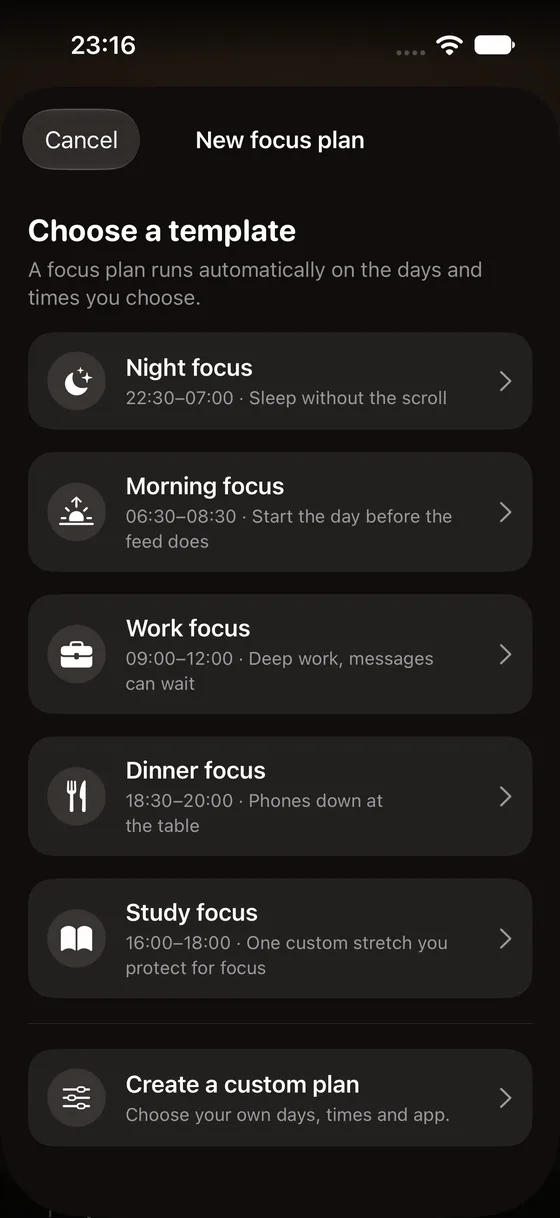
Choose Night focus from the template list - In the editor, tap Choose apps and pick Instagram in Apple's app picker. Change the start time, end time, days or name if you want a different night routine.
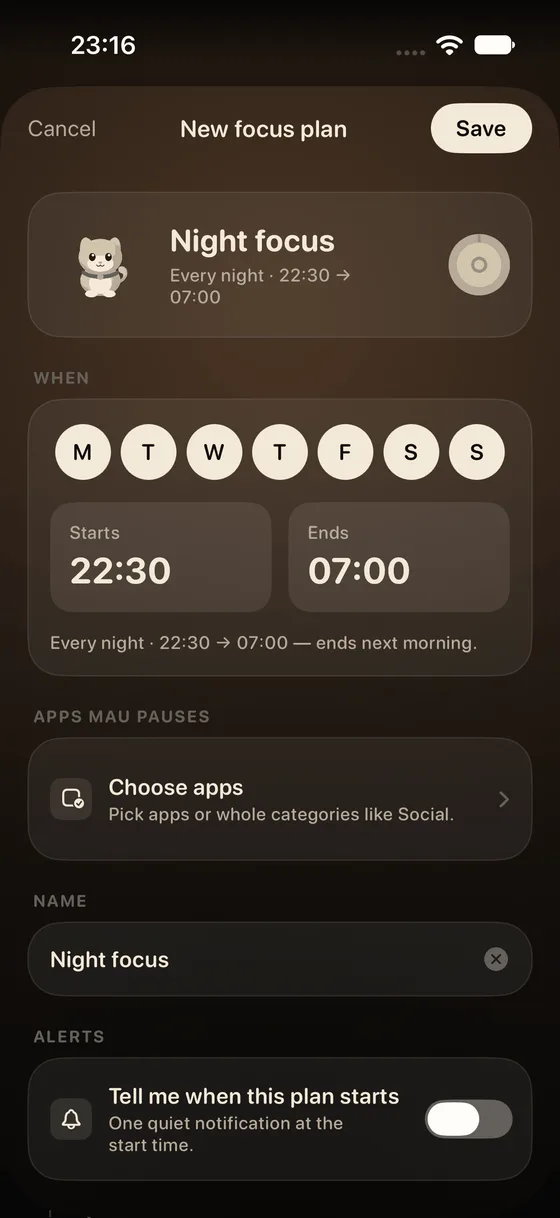
Night focus: every night, 22:30 to 07:00, with the Choose apps row - Save the plan. It starts automatically on the chosen days and times. While it runs, Home shows the plan and "Apps back at 07:00".
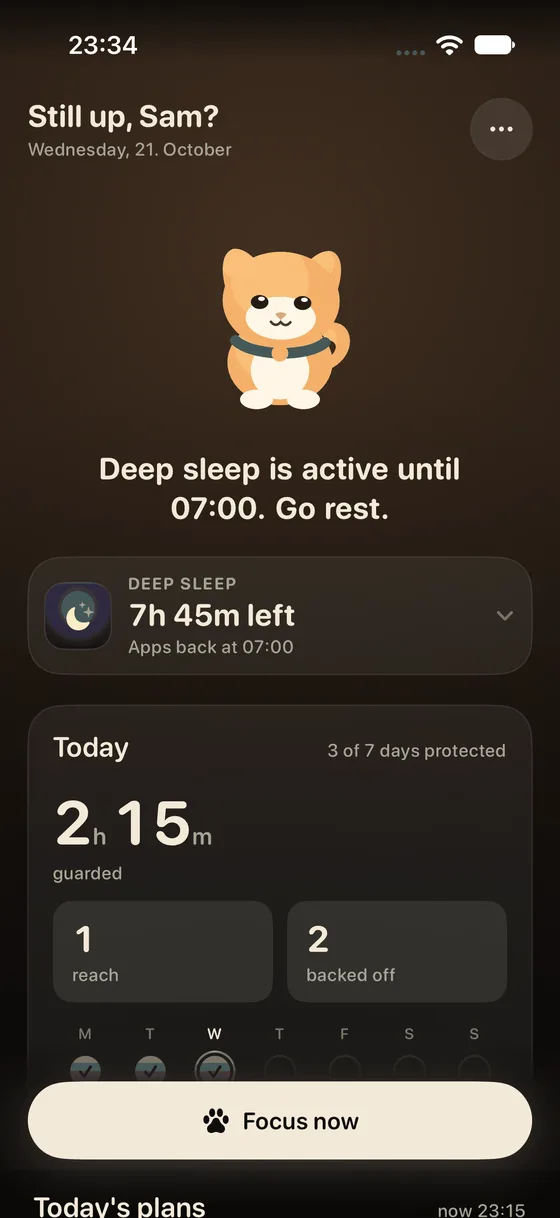
Your night plan running on Home, apps back at 07:00 - If you open Instagram during the plan, Apple's shield screen blocks it. The screen says “Mau's paw is on this one.” and “Night focus · apps back at 07:00.” You can choose Stay focused or Pause with Mau.
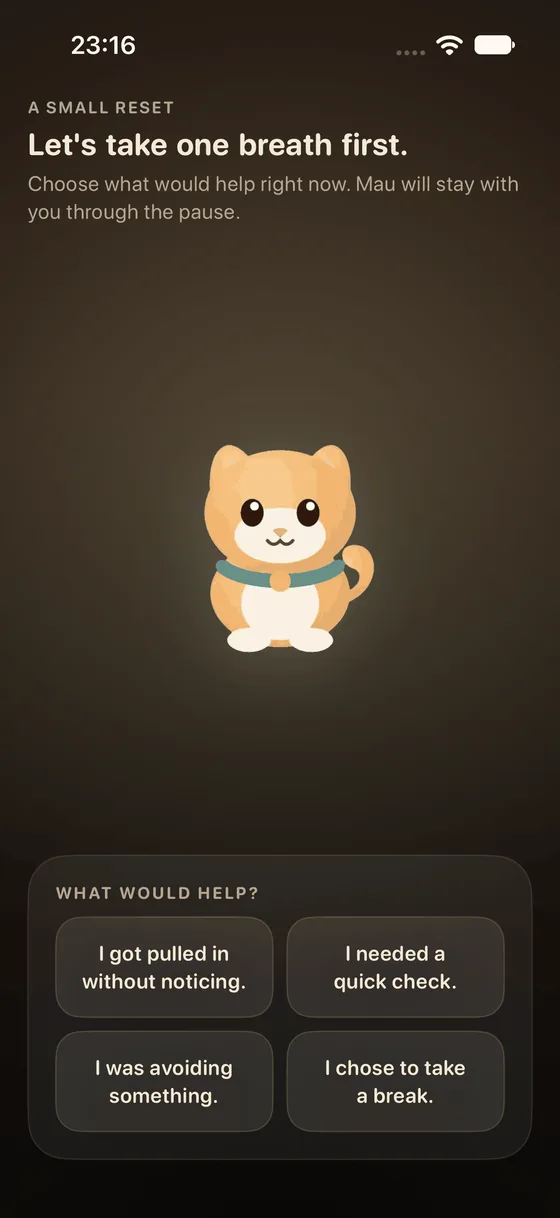
- If you choose Pause with Mau, the screen says “Let's take one breath first.” and asks “What would help?”. You pick an answer, wait a short moment (15 seconds the first time, longer on later pauses), then choose I'm good or Open for 5 min.
In Opal
Based on Opal's own pages, you create a rule, add Instagram to the apps it blocks, and schedule that rule for your night hours across the days you choose (apps.apple.com/us/app/id1497465230; opalapp.com/pricing). If you want the block to be impossible to cancel or bypass, Opal offers Deep Focus, and Opal Pro adds Hard Mode (apps.apple.com/us/app/id1497465230; opalapp.com/pricing).
For a break, Opal says you choose the app, write your intention and set a timer (apps.apple.com/us/app/id1497465230).
With Pawwall, the same task is one template and one save: Night focus is already set to 22:30 to 07:00, and the block is Apple's own shield.
Why people choose Pawwall
- A real block, not a reminder. Pawwall pauses the apps and app categories you choose with Apple's Screen Time. Opening one shows Apple's own shield: "Mau's paw is on this one."
- Plans that run on their own. Night focus, Morning, Work, Dinner and Study templates start and end at the times you set, even across midnight.
- A calm way back in. Pause with Mau starts with "Let's take one breath first." and "What would help?", then a short wait. You decide, and Mau counts both choices.
- Focus now when you need it. Pause your chosen apps right away for 15, 25, 45 or 60 minutes.
- Private by design. The apps you pick and your Screen Time data stay on your iPhone. Apple's Screen Time gives Pawwall only private tokens, never app names or your usage.
- No account, no ads. The membership starts with a 7-day trial on the yearly plan.
Who Pawwall is for
- People who scroll late at night and want their evenings and sleep back.
- People who want a firm block during work or study, without losing the option to get in when it really matters.
- People who would rather not create an account or share their app usage.
Different focus
Opal focuses on blocking rules, scores, friends and strict sessions across iPhone, Mac and Android (opalapp.com). Pawwall focuses on one thing on your iPhone: a real Screen Time block on a schedule, with a calm, deliberate way back in.
How to block Instagram at night with Pawwall
- Open Pawwall and select Night focus from the template list. The template starts with an every-day schedule from 22:30 to 07:00.
Start with the Night focus template - In the plan editor, tap Choose apps and pick Instagram in Apple's app picker, then review the name and days.
Days, start and end time, and the apps Mau pauses - Set the start and end times for your night. The end time can be after midnight.
- Save the plan. It runs automatically on the days and times you chose. When it is active, Home shows how long is left and when your apps come back.
Your night plan running on Home - If you try to open Instagram, Apple's shield appears. Tap Stay focused to go back, or Pause with Mau.
- Pause with Mau starts with “Let's take one breath first.” and the question “What would help?”. Pick an answer, wait the short pause, then choose I'm good or Open for 5 min.
One breath and one question, on one screen 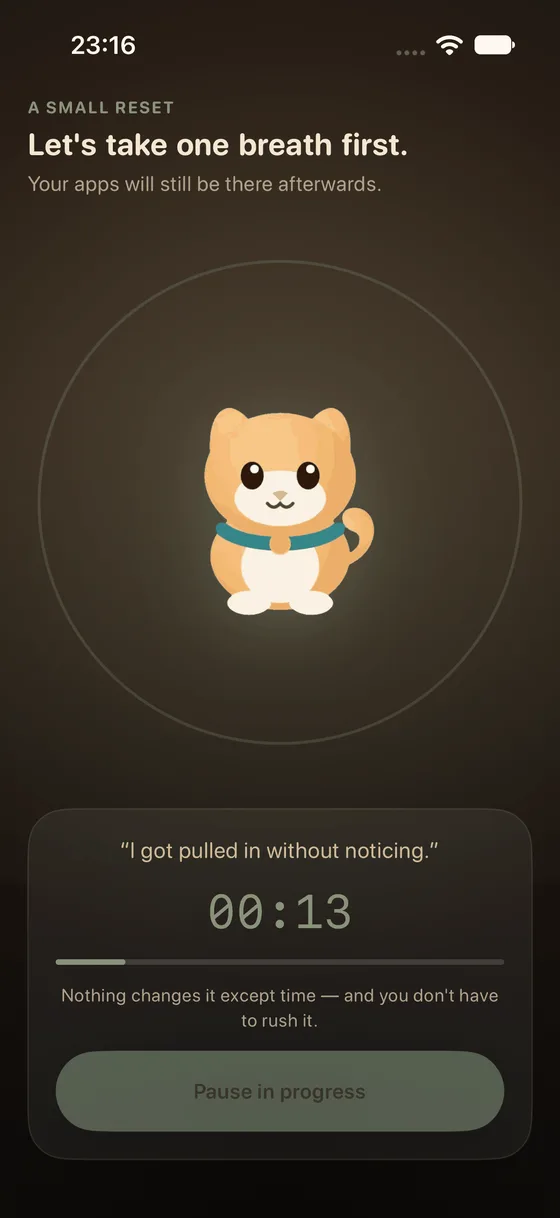
The wait: 15 seconds the first time 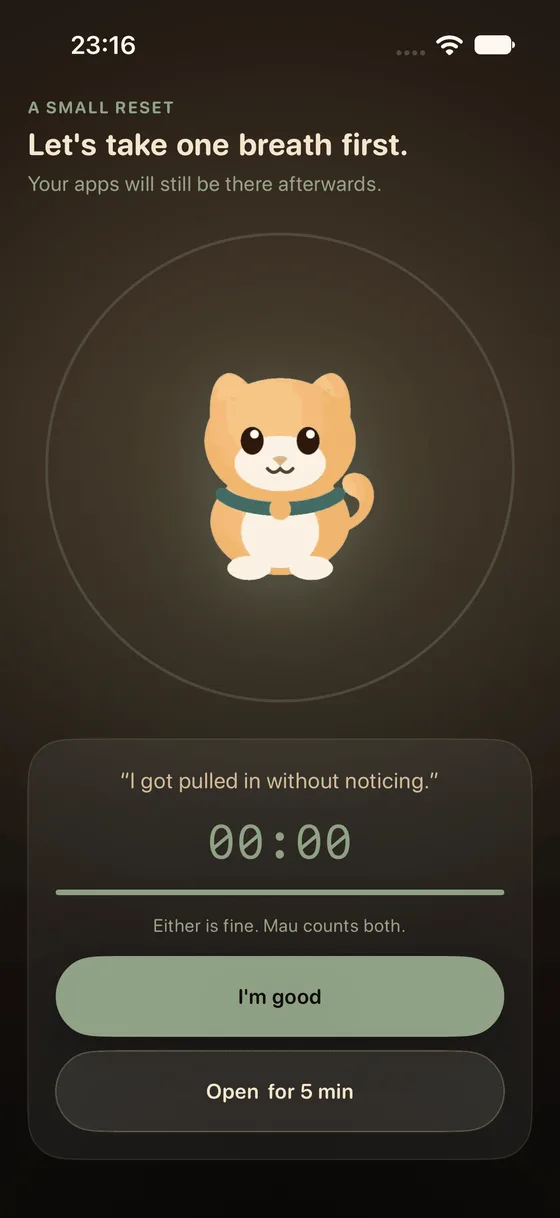
I'm good, or Open for 5 min. Mau counts both.
Sources and last checked
- https://opalapp.com/, checked 21 October 2026
- https://opalapp.com/pricing, checked 21 October 2026
- https://opalapp.com/privacy, checked 21 October 2026
- https://apps.apple.com/us/app/id1497465230, checked 21 October 2026
- https://apps.apple.com/app/id6796812465, checked 21 October 2026
- https://pawwall.app/privacy/, checked 21 October 2026
FAQ
Does Pawwall really block Instagram?
Yes. Pawwall pauses Instagram through Apple's Screen Time. Opening it shows Apple's own shield screen, which is a system block, not a reminder you dismiss with a swipe.
Can a Pawwall schedule cross midnight?
Yes. A plan has a start and end time and can cross midnight. The Night focus template starts at 22:30 and ends at 07:00 every day.
Can I get into an app during Pawwall Night focus?
Yes. Choose Pause with Mau, take one breath, answer one question and complete a short wait. You can then stay focused or open the app for five minutes.
Can I change the Night focus times?
Yes. In the plan editor you can change the start time, the end time, the days and the name.
Do I need a Pawwall account?
No. Pawwall has no account and no ads.
How does Pawwall handle Screen Time data?
The apps you pick and your Screen Time data stay on your iPhone. Apple's Screen Time gives Pawwall only private tokens, never app names or your usage.
What happens when Night focus ends?
Your apps come back on their own. Home shows when that happens, for example "Apps back at 07:00".
See also: Opal alternatives for iPhone.